KnowBe4: One Link Launches Three Phishing Paths
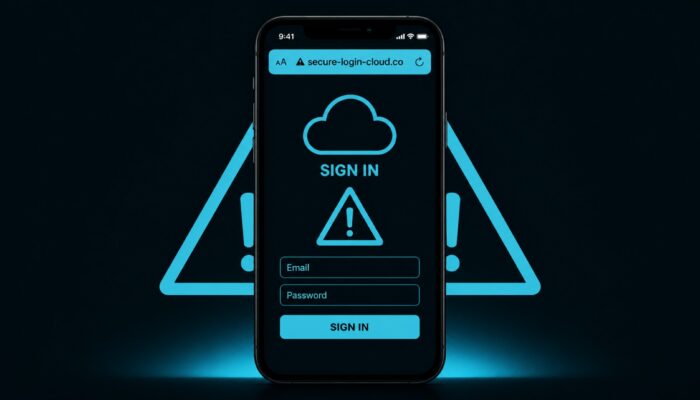
A fake iCloud login alert shows a Windows sign-in and an Apple address. Behind it sits a kit that splits the same click into three operations based on the User-Agent. Windows devices download ScreenConnect. Apple devices are redirected to a separate domain. The rest runs as a live relay over Telegram.
Related: MFA bypass 2026: Why your second factor no longer protects you · RMM tools as an entry point: security checklist for ConnectWise, Kaseya and Co.
The lure carries a Windows sign-in
The email presents itself as an iCloud security alert. An unknown Windows machine has supposedly signed in. A timestamp and an IP appear in the text. The visible address reads account[.]apple[.]com. The click goes somewhere else.
A case number 03483526-WQAD and a long liability footer are meant to make the alert look like an open case. Prabhakaran Ravichandhiran and Jeewan Singh Jalal of the KnowBe4 Threat Lab analysed the sequence. All-about-security.de carried the report on 13 August 2026.
Definition · OS-aware phishing kit
What is an OS-aware phishing kit? A shared lure, then a router. The user agent determines which operation the click triggers. Windows, Apple and the rest run separately. The Threat Lab reconstructed the kit from an open directory on the payload server.
Three redirects lead into the attack
The embedded link opens no phishing page. It passes through three stops. Hop 1 abuses an open redirect on track[.]rbfcu[.]org, the domain of a US credit union. Gateway scanners see a financial address first.
Hop 2 sits on globalema[.]com. The target is embedded in the parameter, base64-encoded. Hop 3 is the payload server cherylbirch[.]com. Before every page, antibot.php filters for Defender, SafeLinks, sandbox IPs and headless browsers. Anyone who fails receives a clean 404.
The operating system determines the attack path
Behind the filter, a PHP script reads the User-Agent. Windows devices are routed internally to the ScreenConnect path. Apple devices, including iPhones, iPads and Macs, are redirected to https://andersonsin[.]com/gg/g. Linux without Android and all others land on a general harvest path on the same machine.
Apple traffic deliberately sits on a second domain. Anyone who finds only cherylbirch[.]com does not automatically see the Apple operation. The same lure runs three separate operations. The analysis does not cite a CVE.
On Windows, ScreenConnect disguises itself as a document viewer
Windows users see a portal in the style of DocSend. A viewer is supposedly needed to open a secure document. Countdown, progress bar and verification seal appear on the page. The file is named ScreenConnect.ClientSetup.exe.
ScreenConnect is a commercial remote maintenance tool with a valid signature. After installation, the operator has access to the screen, files and console. The SHA-256 value of the delivered file reads f9a67b861d56beffa0c880ecc90ec8c1fe6b540aec6438783bb60ea094c0aef9. EDR that only scans for malware sees an IT tool here.
Apple users are redirected without noticing to andersonsin[.]com, using the paths /cc/ and /gg/g. The page imitates a sign-in. Targets there are iCloud and Microsoft 365. The address bar is the only obvious indication that something is amiss. login1[.]indomesinq[.]click appears as a third external harvest domain.
Telegram carries credentials and MFA codes
Android, Linux and the rest run through several sign-in pages on the main server. After submission, the input lands with a Telegram bot. An operator monitors the submitted information and sends the next page. The browser waits on a please-wait screen and polls every three seconds.
This is adversary-in-the-middle. The operator uses the real MFA codes to access the legitimate account while the codes remain valid. Push number matching and one-time codes do not help here. FIDO2 hardware keys authenticate only with the genuine service, so the relay cannot pass the authentication on.
A second Microsoft 365 page claims an incorrect password. The first submission steals the password; the second confirms it. The same infrastructure carries harvest pages for Microsoft 365, Microsoft Authenticator, iCloud, Google, corporate SSO and the HR platform Awardco (iex.html). The iCloud alert is one of several deployments of the same kit.
Two bots appear in the artifacts: @smokeiT_bot for production, @dswagofficebot as a test console. The loot flows into the Telegram group G-MLOGS with five members. JH Lee (@jhlee111) is listed as creator. The lab names @dswag10 as the operator in May 2026. Three bot tokens and PHP error logs reach back to September 2025. That is a small team with at least eight months of operation.
The attacker’s redirect log counts over 250 confirmed human clicks on 5 and 6 May 2026. Of the 157 geolocated victims, 150 were in the US. Among the top countries, Canada and Pakistan follow with two victims each and the United Kingdom with one, together 155 of the 157. According to KnowBe4, the campaign was active in June and July and is currently no longer running. Europe was not a dedicated target. KnowBe4 cannot confirm whether there were clicks from Europe, because the dataset comes predominantly from reported emails that do not capture link clicks. Devices: Apple around 65 percent, Windows around 28, Android and the rest around 7.
geolocated victims were in the US
Source: KnowBe4 Threat Lab, redirect log of 5 and 6 May 2026
DocuSign lure brings remote access to the Mac as well
The KnowBe4 Threat Lab reported another case on 14 August 2026 involving a fake DocuSign signing service. The kit delivered ScreenConnect to both Windows and macOS devices. The report documents a further campaign. A connection between the perpetrators of the two cases remains unproven.
For defence, the comparison means this: the iCloud case leads Apple devices to a fake sign-in, while the DocuSign variant also seeks remote access to those devices. Checks of suspicious remote maintenance installations must therefore cover the devices actually affected. Changing a password alone does not remove an installed remote access tool.
What security teams should check after the click
First, add track[.]rbfcu[.]org, globalema[.]com, cherylbirch[.]com, andersonsin[.]com and login1[.]indomesinq[.]click to gateway, proxy and DNS filters. EDR searches for the hash of the ScreenConnect file. Every unknown ScreenConnect or ConnectWise installation after this click counts as compromised until proven otherwise.
Anyone who entered credentials on a page in this chain needs to reset the affected Apple ID, Microsoft 365 and Google credentials. Outbound Telegram Bot API traffic belongs on the watchlist. Use FIDO2 in place of push authentication and TOTP to protect against the third attack path. The specific lure, combining an iCloud alert, a Windows device and a displayed Apple URL, can be used in a simulation before the attackers reuse the same infrastructure with a different pretext.
Reports go to reportphishing@apple.com and to your own security team. The reconstruction appears in the KnowBe4 Threat Lab post of 30 July 2026. All-about-security.de followed the story on 13 August. The analysis names no CVE number.
Frequently asked questions
Each question is closed. A tap unlocks the answer.
Is there a CVE for this kit?
No. The Threat Lab describes social engineering, redirects, an open directory and commercial remote maintenance. No CVE number appears in the analysis of 30 July 2026.
Does the lure only affect Apple accounts?
No. The alert talks about iCloud. Windows gets ScreenConnect. Apple lands on andersonsin[.]com. The rest runs as a Microsoft login with a live operator. The same machine carries further harvest pages.
Does MFA stop the third path?
Push and TOTP are real codes. The operator uses them to authenticate to the real account. FIDO2 binds verification to the real service. The lab identifies FIDO2 as a method that this relay cannot bypass.
Which domains belong in the filter?
track[.]rbfcu[.]org, globalema[.]com, cherylbirch[.]com, andersonsin[.]com and login1[.]indomesinq[.]click. Plus the hash of the ScreenConnect file. The chain is defanged; remove the brackets before importing into the SIEM.
Is an awareness email to the workforce enough?
An email alone does not remove ScreenConnect. Filters and hash first, then unknown RMM installations, then a password reset, then FIDO2. Simulating this lure is the last step. It should never be the first.
Editor’s Picks
Editor’s PickMicrosoft Teams: Android Path Traversal Runs Attacker Code
More from the MBF Media Network
cloudmagazinAWS Identity Center: Multi-Region joins the setupDigital ChiefsCRA forces manufacturers to report within 24 hours


Image source: AI-generated (August 2026)
Translated from the German original using artificial intelligence. The German version is authoritative.