Adaptive MFA: The Factory Setting is Not Enough
7 Min. Read Time
In most companies, adaptive MFA is enabled but not configured. The switch in the identity portal is turned on, and the risk engine runs with the values provided by the manufacturer. This protects against the broad mass of automated attacks. However, it offers little protection against targeted attackers who know exactly this standard logic. The difference between a checkbox and protection lies in the configuration, which no one touches.
Key Takeaways
- Enabled is not configured. Adaptive MFA with manufacturer default values blocks mass attacks but hardly protects against targeted attackers who know the standard logic.
- The engine is only as good as its signals. Without device status, identity context, and behavioral patterns, risk assessment remains coarse and produces false security.
- Fine-tuning requires a pilot. Anyone who enables policies without an observation phase creates a wave of frustration and gets the exception rule back, which undermines protection again.
Related:Adaptive MFA as a Zero-Trust Lever / Machine Identities
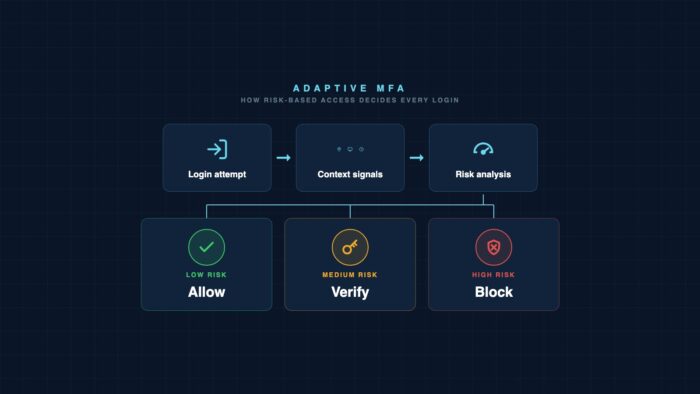
What is adaptive MFA? Adaptive MFA is a multi-factor authentication that makes the required verification dependent on the risk of each login. An engine evaluates signals such as location, device, and behavior and decides whether a login goes through, requires an additional factor, or is blocked. In contrast, static MFA always requires the same second factor.
What risk-based authentication really delivers
The appeal of adaptive MFA is quickly explained. A login from a known company computer in the usual network runs smoothly. The same login at 3 a.m. from a foreign country with an unknown device requires a strong second factor or is stopped. Security where there is risk. Calm where there is none.
In practice, the factory setting does exactly half of that. It catches the loud, broad wave of attacks: credential stuffing, password spraying, the automated attempts that hit every account on the internet. This is not insignificant. Microsoft has been citing an engaging number for years.
The number is impressive and honest, as long as you read what it says. It describes automated attacks. It says nothing about the attacker who has a specific account in their sights, who takes the trouble to study the login process. They know that an untuned engine reacts predictably. This second attacker is rarer but more expensive. And against them, configuration decides.
Where Standard Configuration Falls Short
Manufacturers deliver adaptive MFA with conservative default settings. This is understandable and even necessary. A too-strict factory setting would lock out half the workforce on the first login, rendering the product unusable. So, the control is set cautiously. That’s where it usually stays.
Three gaps regularly emerge in this standard setting. The first is the threshold. The engine calculates a risk value. Only above a threshold does it request an additional factor. If this threshold is set to the conservative default, medium risks slip through unnoticed. A login from a new city in the same country, a slightly different device, an unusual time: individually too weak for the default, collectively a clear pattern.
The second gap is the response. Many setups only know two answers: allow or request an additional factor. The interesting options remain untapped. A session with reduced validity, access without the ability to download sensitive data, a silent alert to the security team at medium risk. Those who only use the coarse switch are sacrificing half the effect.
The third gap is the exception. Almost every organization has one: the executive who constantly travels and is annoyed by the MFA prompt, so they receive a special rule. This exception is often exactly the account with the highest potential damage in the event of a takeover. An unchecked exception list is the quietest way to silently disable adaptive MFA.
Signals an Honest Risk Engine Needs
A risk assessment is only as robust as the signals it sees. Location and IP address alone are not enough, as they can be faked and obscured through proxy services. A viable engine combines multiple layers.
The most important layer is the device status. Is the device managed, is the hard drive encrypted, is the patch level up-to-date, and does the endpoint protection report anomalies? A login from a compliant device is a different risk than the same login from an unknown browser. Those who don’t integrate device signals are flying blind.
The second layer is the identity context. Has the password just been changed, have there been recent failed attempts, does the identity appear in a leak dataset, and does the login pattern deviate from the last few weeks’ history? These signals tell a story that a single IP address can never tell.
The third layer is the behavior after login. Adaptive authentication doesn’t end at the login mask. An account that logs in unobtrusively and then retrieves an unusually large number of records within minutes needs to be reevaluated. This ongoing examination is the part that standard setups most often omit.
What Fine-Tuning Brings and What It Overturns
Fine-tuning adaptive MFA is not a purely technical process. It’s a balancing act between protection and acceptance. The following patterns determine which side the setup falls on.
What Overturns
- Setting thresholds without an observation phase and triggering a frustration wave
- Permanent exceptions for annoyed executives without an expiration date
- Using only location and IP as signals, without device status and history
- Limiting the risk response to allow or block
What Brings
- Setting thresholds based on real login data from an observation phase
- Granting exceptions with a limited term and automatically submitting them for review
- Combining device status, identity context, and behavior as signal levels
- Using graduated responses: shortened session, restricted access, silent notification
The difference between the columns is not a matter of budget. Both setups use the same license and engine. What sets them apart is the willingness to treat configuration as an ongoing task rather than a one-time switch.
How a Pilot Without a Frustration Wave Succeeds
Fine-tuning adaptive MFA cannot be done with a big bang overnight. If thresholds are raised for everyone at once, it will result in a wave of blocked logins on the first morning, an overloaded service desk, and political pressure to reverse everything. A staged pilot avoids this.
The crucial step is phase one. Without observation data, every threshold is a guess. Guessed thresholds are the main cause of the frustration wave. Investing two to four weeks builds the configuration on your own reality, not on an assumption.
Adaptive MFA is already included in most licenses today. The protection it promises does not depend on the purchase, but on the maintenance. An engine that was switched on once and never touched again is an insurance policy that no one has read.
Frequently Asked Questions
Every question is locked. A tap unlocks the answer.
What distinguishes adaptive MFA from regular MFA?
Regular MFA requires the same second factor for every login, regardless of context. Adaptive MFA evaluates each login individually based on signals such as device, location, and behavior, and decides whether to allow a login, require an additional factor, or block it. This reduces friction for innocuous logins and increases protection for risky ones.
Is the standard configuration of adaptive MFA sufficient?
For the broad mass of automated attacks, yes, but against targeted attackers, only to a limited extent. Manufacturers deliberately provide conservative values to prevent anyone from being locked out. This default setting allows medium risks to pass and does not utilize graduated reactions. A configuration tailored to your own environment is the actual protection.
Which signals should the risk engine evaluate?
At least three levels: device status such as management, encryption, and patch level, identity context such as recent password change or appearance in leak data, and behavior after login. Location and IP address alone are too easily falsifiable to provide a reliable assessment.
How to avoid a frustration wave when enabling?
With an observation phase. The engine initially runs for two to four weeks in report mode without blocking. Only based on these real login data are the thresholds set, followed by a pilot group running live, before the rollout goes wide. Incorrectly set thresholds are the main cause of blocked logins and service desk congestion.
How to handle exceptions for executives?
Exceptions should be granted temporarily and automatically submitted for review. A permanent special rule often concerns exactly the account with the highest damage potential. Instead of disabling MFA entirely, a customized policy with phishing-resistant factors like FIDO2 is a better approach, as it provides both comfort and protection.
Editor’s Reading Tips
- Where the mid-market still lags behind in NIS2 technical requirements
- Copilot Cowork acts alone, the SOC doesn’t see it
- Detection Engineering without vendor lock: Wazuh Stack 2026
More from the MBF Media Network
Further reading
KillSec dismantled: 16-year-old suspected of leading group
Investigators dismantled the KillSec ransomware group. Its suspected leader is 16, and initial access often came through cloud storage.

AI Agents Steal 600,000 Credit Card Records
Armed with three AI agents, an attacker targeted hundreds of online shops and stole data from at least 600,000 credit cards.


