Adaptive MFA: Factory Settings Are Not Enough
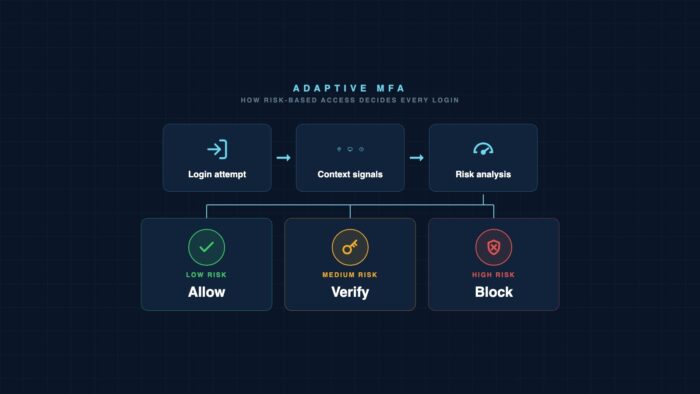
In most companies, adaptive MFA is activated but not configured. The switch in the Identity Portal is on, and the risk engine runs with the values provided by the manufacturer. This protects against the broad wave of automated attacks. However, it provides little defense against the targeted attacker who knows the standard logic. The difference between having it checked and actual protection lies in the configuration that no one bothers to set up.
Key Takeaways
- Activated is not configured. Adaptive MFA with manufacturer default values blocks mass attacks but offers little defense against a targeted attacker who understands the standard logic.
- The engine is only as good as its signals. Without device state, identity context, and behavioral patterns, the risk assessment remains rough and produces false security.
- Fine-tuning requires a pilot. Those who set policies without an observation phase create a wave of frustration and end up with the exception rule that weakens the protection.
Related:Adaptive MFA as a Zero-Trust Enabler / Machine Identities
What is adaptive MFA? Adaptive MFA is a multi-factor authentication method that adjusts the required proof based on the risk of each login attempt. An engine evaluates signals such as location, device, and behavior and decides whether a login should proceed, require an additional factor, or be blocked. Static MFA, on the other hand, always requires the same second factor.
What Risk-Based Authentication Actually Achieves
The appeal of adaptive MFA is quickly explained. A login from a known company computer in the usual network proceeds smoothly. The same login at 3 AM from a foreign country with an unfamiliar device requires a strong second factor or is blocked. Security where risk exists. Calm where there is none.
In practice, the default setup does half the job. It stops the loud, broad wave of attacks: credential stuffing, password spraying, and the automated attempts that hit every account on the internet. This is significant. Microsoft has been quantifying the effect of multi-factor authentication for years with a striking number.
The number is impressive and is honest as long as you read what lies behind it. It describes automated attacks. It does not say anything about the attacker who targets a specific account and invests the effort to study the login flow. This attacker knows that an untuned engine behaves predictably. This second attacker is less common but is the expensive mistake. And against him, the configuration makes the difference.
Where Standard Configuration Ends
Manufacturers deliver adaptive MFA with conservative default settings. This is understandable and even necessary. A too-aggressive initial setup would exclude half the workforce during the first login and render the product unusable. Therefore, the default settings are cautious. This is where they usually remain.
Three gaps regularly appear in this standard setup. The first is the threshold. The engine calculates a risk value. Only above a certain threshold does it demand an additional factor. If this threshold is set to the conservative default, moderate risks slip by unnoticed. A login from a new city in the same country, a slightly different device, an unusual time of day: individually too weak to trigger the default, together they form a clear pattern.
The second gap is the response. Many setups have only two options: allow or demand an additional factor. The interesting options remain unused. A session with shortened validity, access without the ability to download sensitive data, a quiet notification to the security team for moderate risks. Those who only use the basic switch miss half the effectiveness.
The third gap is the exception. Almost every organization has one: the executive who travels constantly and is annoyed by the MFA prompt, thus receiving a special rule. This exception is often the account with the highest potential damage in case of a breach. An unverified exception list is the easiest way to disable adaptive MFA.
Signals an Honest Risk Engine Requires
A risk assessment is only as good as the signals it sees. Location and IP address alone are not sufficient because they can be spoofed and hidden behind proxy services. A robust engine combines multiple layers.
The most important layer is the device condition. If the device is managed, the hard drive is encrypted, a current patch level is applied, and the endpoint protection reports anomalies, a login from a compliant device poses a different risk than the same login from an unknown browser. Those who do not incorporate device signals are flying blind.
The second layer is the identity context. If the password was recently changed, there were failed attempts shortly before, the identity appears in a leak dataset, or the login pattern deviates from the last week’s history, these signals tell a story that a single IP address cannot convey.
The third layer is behavior after login. Adaptive authentication does not end at the login screen. A account that logs in inconspicuously and then, within minutes, retrieves an unusual number of data sets should be re-evaluated. This continuous monitoring is the part that standard setups most often omit.
The Fine-Tuning Balancing Act
Adaptive MFA sharp-tuning is not just a technical process. It’s a delicate balance between security and user acceptance. The following patterns determine which side the setup leans towards.
What Tips It
- Sharply setting thresholds without an observation phase, causing a wave of frustration
- Permanent exceptions for frustrated leaders without expiration dates
- Using only location and IP as signals, ignoring device state and history
- Limiting the risk response to either allowing or blocking
What Balances It
- Setting thresholds based on real login data from an observation phase
- Granting temporary exceptions with automatic review
- Combining device state, identity context, and behavior as signal layers
- Using graduated responses: shortened sessions, limited access, silent notifications
The difference between the columns is not a budget issue. Both setups use the same license and engine. What separates them is the willingness to treat configuration as an ongoing task rather than a one-time switch.
How a Pilot Without Frustration Works
Adaptive MFA sharp-tuning does not tolerate a big push overnight. Those who raise thresholds for everyone at once will create a wave of blocked logins, an overloaded service desk, and political pressure to revert everything. A phased pilot avoids this.
The critical step is Phase 1. Without observation data, any threshold setting is guesswork. Guessed thresholds are the primary cause of frustration. Investing the two to four weeks builds the configuration on actual reality, not assumptions.
Adaptive MFA is already included in most licenses today. The protection it promises does not depend on the purchase but on the maintenance. An engine that was turned on once and never revisited is an insurance policy that no one has read the fine print of.
Frequently Asked Questions
Every question is locked. A tap unlocks the answer.
What distinguishes adaptive MFA from regular MFA?
Regular MFA requires the same second factor for every login, regardless of the context. Adaptive MFA evaluates each login individually based on signals such as device, location, and behavior, and then decides whether to allow the login, require an additional factor, or block it. This reduces friction for legitimate logins and increases security for risky ones.
Is the standard configuration of adaptive MFA sufficient?
For automated attacks, yes, but for targeted attackers, only to a limited extent. Manufacturers intentionally provide conservative settings to avoid locking out users. This default configuration allows moderate risks and does not utilize graduated responses. A configuration tailored to your specific environment is the true safeguard.
Which signals should the risk engine evaluate?
At least three levels: device condition (such as management, encryption, and patch status), identity context (such as recent password changes or appearance in leaked data), and behavior after login. Location and IP address alone are too easy to manipulate to provide a reliable assessment.
How can you avoid a wave of frustration during the rollout?
With an observation phase. The engine runs for two to four weeks in report mode without blocking. Based on these actual login data, thresholds are set, and then a pilot group is run before the rollout to the wider audience. Misjudged thresholds are the primary cause of blocked logins and service desk backlogs.
How should you handle exceptions for executives?
Exceptions should be time-bound and automatically reviewed. A permanent special rule often affects the account with the highest potential damage. Instead of completely disabling MFA, a tailored policy with phishing-resistant factors like FIDO2 is better, as it provides both comfort and security.
Editor’s reading tips
- Where the Mittelstand lags behind in NIS2 technical requirements
- Copilot Cowork acts alone, the SOC doesn’t see it
- Detection Engineering without vendor lock: Wazuh Stack 2026
Editor’s Picks
Editor’s PickWhere the SME Sector Still Lags Technically on NISEditor’s PickCopilot Cowork Acts Alone, the SOC Doesn’t See ItEditor’s PickDetection Engineering Without Vendor Lock: Wazuh Stack 2026


More from the MBF Media Network
cloudmagazinPlatform Engineering is no longer just a DevEx projectDigital ChiefsRaw Materials Policy Becomes Tech PolicyMyBusinessFutureProcess Optimization Without Permanent Project


Translated from the German original using artificial intelligence. The German version is authoritative.
Further reading

Attacker accounts remain active after the Artifactory patch
Admin accounts, backdoors and remote access services survive the update. Attacks on Artifactory and PaperCut show what still needs to be checked after patching.

Rehearse the IT outage before no one is left to decide
Two hours analog, fixed roles and an annual calendar let you rehearse a real outage before operations stop.

Microsoft Teams: Android Path Traversal Runs Attacker Code
Microsoft Teams for Android allows path traversal. NVD added CVE-2026-65768 on August 11, 2026. Microsoft rates it 8.8, NVD rates 9.8.


